Profiles
A profile is a YAML file that says what a run simulates: which domains run, which substitutes
replace the others, their step sizes, and how fast to run. Profiles are validated against
profiles/schema.json (JSON Schema 2020-12). The format is
specified in RFC 0005 and formats.md.
A profile
profiles/examples/amr_sample_urdf.yaml, the run the v0.2 simulator offers:
schema_version: 1
stage: robots/amr_diffdrive/amr_diffdrive.urdf

domains:
  rigid_body:   { enabled: true,  backend: mujoco, dt: 0.001 }
  electrical:   { enabled: false, substitute: ideal }
  thermal:      { enabled: false, substitute: ambient }
  aerodynamics: { enabled: false, substitute: zero }
  weather:      { enabled: false, substitute: clear }
  emi:          { enabled: false, substitute: zero }
  radiation:    { enabled: false, substitute: zero }
  sensors:      { enabled: true }

time: { real_time_factor: 1.0 }
schema_version,stageanddomainsare required.stageis what to simulate. This version loads URDF robots:lagrangelooks the path up as written, next to the profile, and in the installed sample assets. USD stages follow.Every domain is either
enabled: trueorenabled: falsewith asubstitute. The schema refuses a disabled domain without one, so a profile cannot leave a gap.dtis a step size in seconds and must be a whole number of nanoseconds.
The other examples in profiles/examples/ describe later releases (an arm with MoveIt, a drone
with PX4, a car with Autoware). They validate against the schema, but this simulator cannot run
them yet.
What v0.2 applies
Key |
Applied |
Checks |
|---|---|---|
|
yes: an off domain’s modules are replaced by its substitute |
an enabled domain needs a module here; the substitute must be one this simulator has |
|
yes |
0.0001 to 0.01 s |
|
must be |
|
|
yes, at once |
0 means as fast as possible |
|
yes: replaces |
each as |
|
not yet: a warning |
Applying a profile rebuilds the wiring and restarts the run at t = 0. If the new wiring fails, the run keeps the profile it had.
Three ways to use one
From the command line:
lagrange validate my_profile.yaml        # errors and warnings, with JSON pointers
lagrange graph my_profile.yaml | dot -Tsvg -o wiring.svg
lagrange run my_profile.yaml             # the simulator, with the profile applied, headless
lagrange my_profile.yaml --robot ROBOT --world WORLD (the lagrange command of the
CLI page) runs the same with the viewer open, as lagrange quad does: a YAML file
with domains: is a profile.
lagrange here is ros2 run lagrange_server lagrange (see the CLI page).
In the viewer: the Domains workspace shows the applied profile. Switch a domain, change its step or choose a substitute; the viewer validates the edited profile against the schema and the server, previews the wiring, and applies it with Apply and restart.
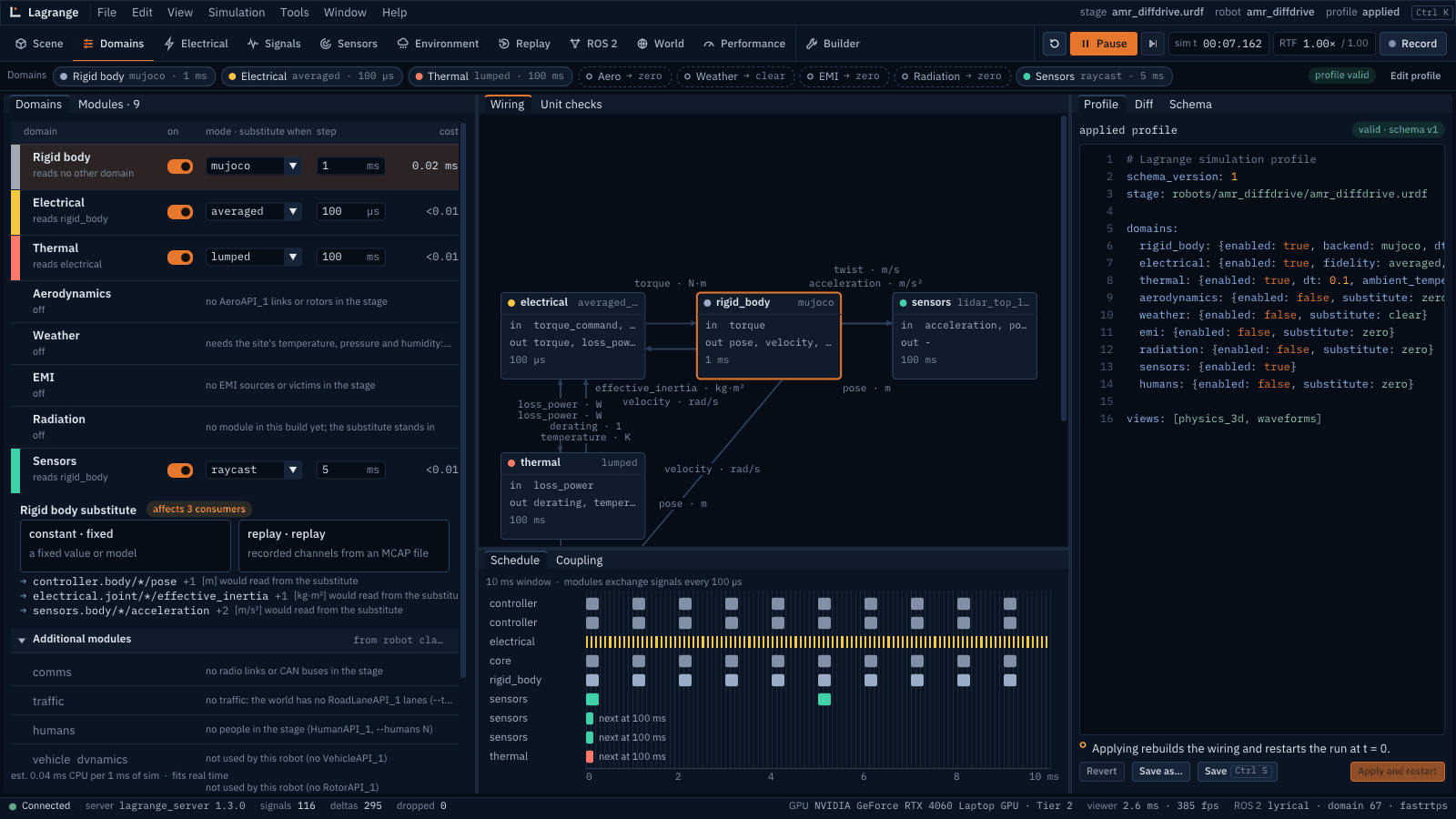
On lagrange_server’s command line: --domain D=off substitutes a domain without writing a
profile, for rigid_body, electrical, thermal, weather, emi, comms, vehicle_dynamics, traffic and sensors.
Errors you may see
Message |
Meaning |
|---|---|
|
the profile is for another robot: start |
|
the domain exists in the format, not yet in the simulator |
|
that substitute is not available for this domain yet |
|
step outside what the physics supports |
a JSON Schema message with a pointer, such as |
a typo or a missing field; the schema allows no unknown keys |