The lagrange command¶
lagrange is on the PATH once ROS is sourced (package lagrange, tools/cli/). Without a
command it runs the simulator and its viewer together, like gazebo:
source /opt/ros/lyrical/setup.bash && source install/setup.bash
lagrange [SAMPLE | ROBOT [WORLD] | RUN.yaml | PROFILE.yaml] [SERVER OPTIONS] [-- VIEWER OPTIONS]
lagrange --server-only ...         # the server alone, headless
lagrange viewer [VIEWER OPTIONS]   # the viewer alone
lagrange samples                   # amr (default), sedan, quad, lexus, x500, swerve, people, empty
lagrange empty                     # no robot, no world: the ground only
lagrange spawn FILE [--name NAME] [--at X,Y[,Z[,YAW]]]   # a robot into the running simulator
lagrange delete NAME               # and out again
A simulation profile (a YAML file with domains:, profiles) runs as
lagrange run PROFILE does, with the viewer: lagrange profiles/examples/quad_x500_downwash.yaml --robot assets/robots/quad_x500/quad_x500.usda --world none. lagrange run itself is headless.
The server listens on a socket of its own for the run ($XDG_RUNTIME_DIR/lagrange/run-PID.sock,
unless --listen is given), so it never meets another simulator on the default socket; closing
the viewer stops it, and Ctrl-C stops both. The commands below are the simulator’s tools; they
are also ros2 run lagrange_server lagrange <command>:
lagrange <command> [arguments]
Command |
What it does |
|---|---|
|
Runs the simulator with the profile applied and serves it to viewers and ROS 2, like |
|
Checks each profile against |
|
Prints the wiring of the run (modules and the signals between them) as a Graphviz digraph |
|
Runs the simulation twice, without ROS and with the CPU lidar, and compares the hashes of the whole state every 100 ms of simulated time. Exits 1 at the first difference (default 10 s) |
|
Writes the robot’s power system (from its electrical schemas or overlay) as an ngspice netlist or a Modelica model, for offline study: battery ECM, bus capacitors, loads, and the drives as averaged power sinks whose power you set |
|
Prints the version, the installed sample robot, world and profile schema, the viewer socket, and the Vulkan devices with their capability tiers |
The options are the same as lagrange_server’s (--robot, --world, --overlay, --spawn,
--lidar, --physics, --rtf, --no-ros, --record, …; lagrange --help lists them).
--physics jolt (or a profile’s rigid_body: {backend: jolt}) runs the rigid bodies on Jolt
instead of MuJoCo; MuJoCo stays the default and the reference (rigid_body.md §7).
--overlay FILE.yaml applies the project’s schemas to a robot from a format that cannot carry
them (motors, battery, bus on a URDF; formats.md §9). The
sample AMR gets its power system from amr_diffdrive.overlay.yaml by default; another --robot
gets no overlay unless one is given, and --overlay none turns it off. It also takes a SPICE
netlist (FILE.cir, sample assets/robots/amr_diffdrive/amr_diffdrive_power.cir), the same file
ngspice runs; what it can read is in formats.md §9.1.
Spawning robots¶
Like Gazebo, the simulator can start without a robot (lagrange empty, or --robot none with
any world) and take robots while it runs. Three ways do the same thing:
lagrange spawn robot.urdf --at 2,0from a terminal (it prints the entity name,/robot);lagrange delete /robottakes it out;the viewer’s File → Add robot or open recording (Ctrl+O): the robot goes to the origin of an empty run, else 3 m beside the robots there are;
the standard ROS 2 services of
simulation_interfaces:/spawn_entity,/spawn_entities,/delete_entity, and/reset_simulationwithSCOPE_SPAWNED, from any language:
ros2 service call /spawn_entity simulation_interfaces/srv/SpawnEntity \
  "{name: mate, entity_resource: {uri: $PWD/assets/robots/amr_diffdrive/amr_diffdrive.urdf},
    initial_pose: {header: {frame_id: world}, pose: {position: {x: 0.0, y: 4.0}}}}"
ros2 service call /delete_entity simulation_interfaces/srv/DeleteEntity "{entity: /mate}"
The file is a URDF, SDFormat, MJCF or USD path (file:// and package:// URIs too), or its text
in resource_string; xacro is run first (xacro robot.urdf.xacro > robot.urdf). Without a
name, text is named by its own <robot name> and a file after its file name; a name that is
taken fails with NAME_NOT_UNIQUE unless allow_renaming: true, which numbers it (crate_2),
and text that names no robot fails with NAME_INVALID unless renaming is allowed. A file that
does not parse comes back as RESOURCE_PARSE_ERROR with the parser’s own message. The pose is in
the frame world, the frame of /odom’s origin; the robot is placed as --spawn places it, its
lowest collision shape just above z.
The first robot in a run without one is the robot:
/cmd_vel,/odom,/joint_states,/robot_descriptionand its sensors’ topics are its, and the demo driver (or the built-in multicopter controller) drives it. Robots after it are passive, with their names prefixed (mate_base_link), as--add-robotmakes them: nothing drives them, so a second quadcopter stands with its rotors still while the first flies on;entity_namespaceis not supported yet.A spawn or a delete rebuilds the run with the new set of robots. Time goes on (
/clocknever jumps back), every body keeps its pose and, with MuJoCo, every joint its position; velocities start from rest. A module that reads and writes the same signals in the new run (the first robot’s controller, its sensors’ filters and odometry) goes on with its own state; one whose robots changed (physics, an electrical network the new robot joins) starts again. A spawn that is refused leaves the run as it was. A recording stops at the change.reset_simulationgoes back to t = 0 with the robots there are, where they were spawned.Any robot can be deleted, the one the simulator started with too; the world’s scenery cannot.
Plugins¶
A plugin is a shared library built against the C ABI (lagrange_plugin.h, RFC 0001 and 0008)
that holds one or more modules. Load it when the server starts:
lagrange --plugin libacme_sonar.so            # a path
lagrange --plugin acme_sonar                  # lib<name>.so in $LAGRANGE_PLUGIN_PATH, then the
                                              # lagrange_plugins resource of a colcon package
lagrange run profile.yaml                     # with plugins: [{library: acme_sonar, config: {...}}]
What a module does depends on its domain:
a domain of its own (
acme_sonar): it runs in every run;--domain acme_sonar=offturns it off. Its settings are the profile’splugins[].config(config_get_real,config_get_string);a built-in domain, as a substitute: the profile names it,
electrical: {enabled: false, substitute: acme_bench};rigid_body, as a backend:--physics NAMEorrigid_body: {backend: NAME}.
A plugin built for ABI 1.1 also sees the scene: every body, joint, collider and sensor of the
world (world_body, world_joint, world_collider, world_sensor, world_site, filling
versioned structs), and in step ray and overlap queries against every collider where physics
put it (scene_ray, scene_rays, scene_overlap_sphere; exact and deterministic, the CPU
lidar’s caster). C++ plugins can read the whole world into plain containers with the header-only
lagrange/plugin_sdk/World.hpp. The server logs every module it loaded and what it is for. A profile applied from the viewer can
configure loaded plugins but never load one.
Custom sensors¶
Lagrange simulates 36 kinds of custom sensor itself (bumpers, rangefinders, force-torque, sonar,
…): Sensors lists them. A robot file can also carry sensors Lagrange does not
simulate itself, for a plugin to implement. In
URDF (<gazebo reference>) and SDFormat, a <sensor> of any other type (sonar, tof,
gas) becomes a custom sensor of that kind, with its pose, rate and every leaf element as a
parameter by its path (<tof><range><max>4</max></range></tof> is range/max = 4; the first
element named as the type is left out). In USD it is CustomSensorAPI_1 with
sensor:custom:kind and sensor:custom:param:range:max. A plugin finds its sensors with
world_sensor (kind) and reads the parameters with world_sensor_param_real and
world_sensor_param_string.
The time-of-flight plugin that comes with Lagrange implements kind tof:
lagrange --robot my_robot.urdf --plugin lagrange_tof
# sensor/<name>/range (m, +inf when nothing is in range) and sensor/<name>/valid on the bus
Its parameters are range/min, range/max, fov (a 5 × 5 grid of rays over a square field of
view; 0 for one ray) and noise/stddev; its source, core/plugin_abi/samples/tof_sensor.c, is the
example of the plugin guide.
Sensor kinds on ROS 2¶
Every custom sensor (a built-in kind, docs/design/domains/sensors.md §9, or a plugin’s) is on ROS
2 from the first run with no mapping file: its numbers on /<sensor>/<quantity>, on the message
a real driver of the device publishes where ROS has one (a rangefinder or cliff sensor
sensor_msgs/Range, a safety scanner or multibeam sonar LaserScan, wheel odometry
nav_msgs/Odometry, a battery monitor BatteryState, a joint torque sensor JointState, a
force-torque sensor WrenchStamped, detections vision_msgs/Detection2DArray and
Detection3DArray), and otherwise by their unit (Temperature, FluidPressure,
RelativeHumidity, Illuminance, Vector3Stamped, std_msgs Float64, Bool, Int64,
Float64MultiArray). The table is sensors.md §9 “ROS topics of the built-in kinds”. For example
the safety AMR:
lagrange assets/robots/amr_diffdrive/amr_diffdrive_safety.urdf
ros2 topic echo /safety/scan          # sensor_msgs/LaserScan
ros2 topic echo /cliff_front_left/range  # sensor_msgs/Range
ros2 topic echo /wheel_odom/odom      # nav_msgs/Odometry
They are stamped when sampled, delayed by the sensor’s latency and jitter, faulted as its
signals are, and built only while something subscribes. A --ros-topics map (below) wins: an
entry on the same topic, or one that publishes a signal a default topic carries, replaces that
default; kind_topics: false in the map turns them all off.
Plugin outputs on ROS 2¶
A plugin writes signals; --ros-topics FILE.yaml puts them on ROS topics, and topics into
signals, without the plugin linking ROS:
publish:
  - {signal: sensor/front_tof/range, topic: /front_tof/range, type: sensor_msgs/msg/Range,
     frame: front_tof, params: {min_range: 0.02, max_range: 4.0, field_of_view: 0.44}}
  - {signal: acme/gas/ppm, topic: /gas, type: std_msgs/msg/Float64}
subscribe:
  - {topic: /acme/valve, type: std_msgs/msg/Float64, signal: acme/valve/command, unit: "1"}
lagrange --robot my_robot.urdf --plugin lagrange_tof --ros-topics topics.yaml
A signal is published each time its writer commits it, stamped with simulation time. Custom
sensors need no map (above); a map entry replaces the default topic it covers. Published
types: std_msgs Float64, Float64MultiArray, Bool, Int64; sensor_msgs Range, Temperature (the
signal in K, the message in °C), FluidPressure, Illuminance, RelativeHumidity, LaserScan (ranges,
with angle_min/angle_max/range_min/range_max in params), PointCloud2 (x, y, z triples);
geometry_msgs PoseStamped, TwistStamped, WrenchStamped, Vector3Stamped. A subscribed topic
(std_msgs Float64, Float64MultiArray with size, Bool, Int64) becomes a signal in unit, held
between messages and 0 until the first. A signal that is missing, or whose size or unit the
message cannot carry, stops the start with the entry named.
Physics engines as plugins¶
A plugin module of domain rigid_body is a physics backend: lagrange --plugin LIB --physics NAME. What it must output and accept is docs/design/domains/rigid_body.md §8, and the
conformance suite checks it:
LAGRANGE_CONFORMANCE=my_engine@libmy_engine.so ros2 run lagrange_server lagrange_physics_conformance
lagrange --plugin lagrange_jolt --physics jolt_abi     # Jolt through the C ABI, the worked example
Sensor faults¶
To see how your robot’s software copes when a sensor fails, give the run faults (every sensor:
Sensors). Each is
--sensor-fault NAME[:QUANTITY]=MODE[,key=value...] (repeatable), the same text in a run file’s
sensor_faults: list (or as a map, below), or a profile’s sensor_faults::
# the IMU's z rate jumps by 0.02 rad/s at 5 s; the front lidar loses 30 % of its scans from 10 to 12 s
lagrange amr --sensor-fault imu:angular_rate=bias,value=0.02,at=5,component=2 \
             --sensor-fault front_lidar=dropout,at=10,for=2,probability=0.3
lagrange amr --sensor-fault imu=disconnect,at=20        # the IMU's cable comes off at 20 s
Mode |
Keys |
What the robot gets |
|---|---|---|
|
|
no message for a lost sample, or NaN with |
|
|
the last reading before |
|
|
the reading plus |
|
|
the reading plus |
|
|
the reading plus Gaussian noise |
|
|
nothing (or NaN) from |
Times are in seconds of simulated time (at default 0, for default for good); value, rate and
sigma are in the quantity’s unit. Without :QUANTITY a fault takes all of the sensor’s
quantities (only dropout, stuck, disconnect). The quantities are the sensor’s signals
sensor/<name>/<quantity>: lagrange graph or the viewer’s Scopes list them, and a fault that
names one the sensor does not have says which it has.
What ROS, plugins, recordings, Python and the viewer get is the faulted value; /ground_truth/odom
and /tf are not. Each faulted sensor writes sensor/<name>/fault/active and
sensor/<name>/fault/dropped (samples lost so far), for a scope or --ros-topics. Random dropouts and
noise follow the run’s seed, so a run repeats. In a run file or a profile:
sensor_faults:
  - imu:angular_rate=bias,value=0.02,at=5,component=2
  - {sensor: front_lidar, mode: dropout, at: 10, for: 2, probability: 0.3}
In Python: lagrange.Simulation(robot, sensor_faults=["imu=stuck,at=2,for=1"]). The model and its
limits: sensors.md, “Sensor faults (as built)”.
Profiles and stages¶
A profile (RFC 0005) chooses which domains run, which substitutes replace the others, and the
step sizes. Its stage names what to simulate. This version loads URDF robots, so stage is a
URDF path, looked up as written, next to the profile, and in lagrange_assets. With
--robot FILE, the profile is checked against that robot instead, whatever its stage says.
profiles/examples/amr_sample_urdf.yaml is the run the v0.2 simulator offers: the sample AMR
with MuJoCo physics and its IMU and lidars, every domain without a module yet substituted.
$ lagrange validate profiles/examples/amr_sample_urdf.yaml
profiles/examples/amr_sample_urdf.yaml: valid (0 errors, 0 warnings)

$ lagrange validate profiles/examples/amr_warehouse_nav2.yaml --robot assets/robots/amr_diffdrive/amr_diffdrive.urdf
profiles/examples/amr_warehouse_nav2.yaml: invalid (2 errors, 4 warnings)
  error   /domains/electrical/enabled: electrical has no module in this server yet; disable it and name a substitute
  error   /domains/thermal/enabled: thermal has no module in this server yet; disable it and name a substitute
  warning /environment: not applied by this server yet
  ...
Errors use JSON pointers into the profile, as the viewer’s Domains panel does. Settings the server accepts but does not apply yet are warnings.
The wiring graph¶
lagrange graph profiles/examples/amr_sample_urdf.yaml | dot -Tsvg -o amr-wiring.svg
Each box is a module with its step size; each arrow is one signal, from the module that writes it to the one that reads it. Dashed arrows are feedback inputs, which read the writer’s previous step to break a loop. Dashed boxes are substitutes standing in for a disabled domain. For the sample AMR:
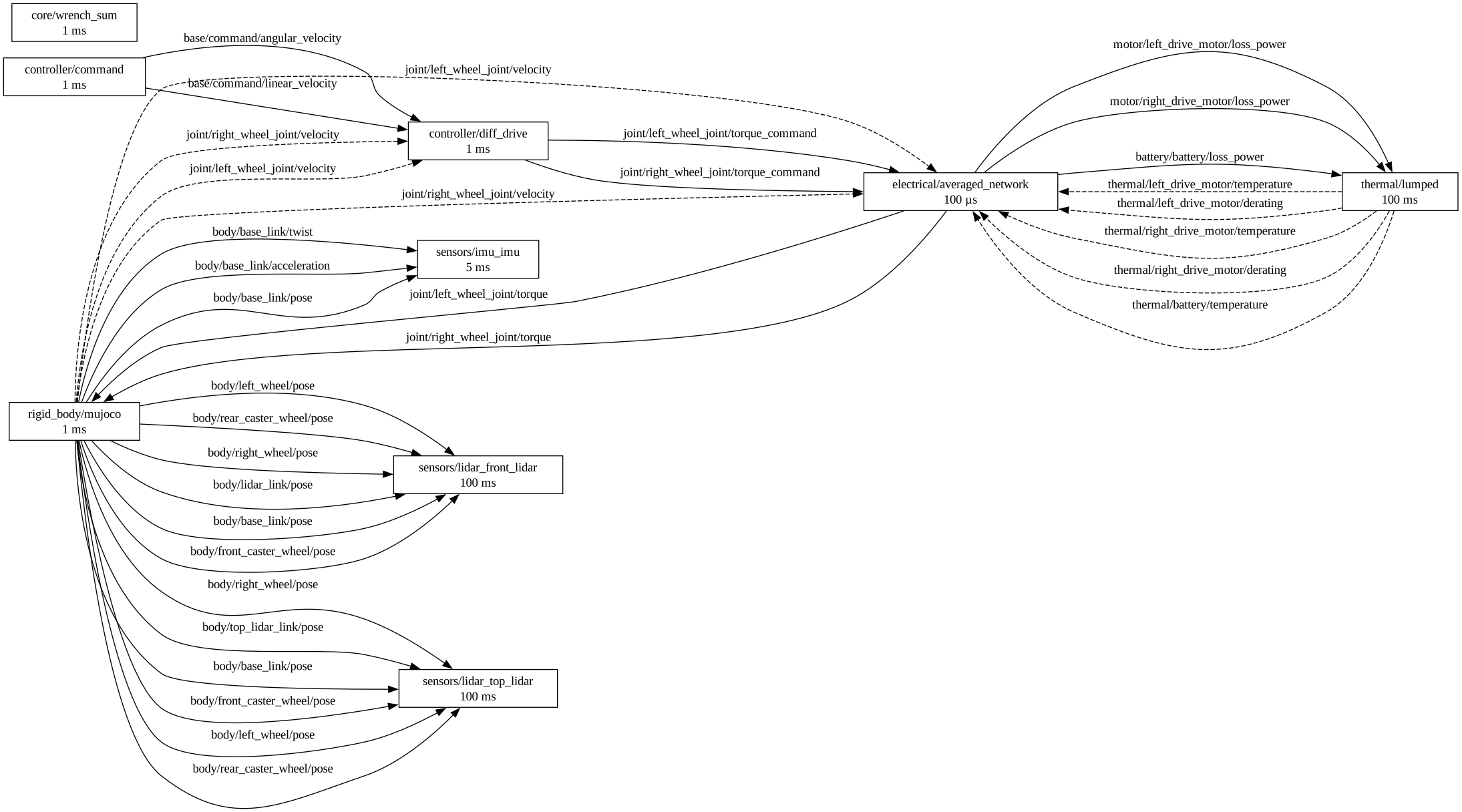
The diff-drive controller writes wheel torque commands. The electrical network
(electrical/averaged_network, every 100 µs) turns them into the torques MuJoCo reads, through
the sample’s motors, drives and battery (its overlay file): a command beyond the drive’s current
or the bus voltage is not delivered, and the battery’s charge, the bus voltage and the motor
currents are signals of their own. With --domain electrical=off, or a robot without motors,
the ideal substitute takes its place and passes the commands through unchanged. Both read the
wheel velocities back as feedback inputs, so each loop has a one-step delay instead of a
cycle. core/wrench_sum adds up external forces on the
bodies (none in this world). The
sensors read body poses (and the IMU also twist and acceleration) at their own rates.
Checking a robot before running it¶
lagrange check robot.urdf [--overlay power.cir]
For a robot fixed to the ground it lists each joint: the mass beyond it, the gravity torque at the pose the file starts in, the worst case with every link straight out sideways, its effort limit and what its motor can give. It also lists each link’s mass against the volume of its collision shapes, a lower bound on its density, and says when no solid could be that dense. It exits with 1 when a joint cannot hold the robot where it starts. CAD exports often have masses far off, so an arm lying on the ground usually shows here first.
Splitting concave collision meshes¶
A collision mesh collides as its convex hull, which fills in what is hollow. For a URDF:
lagrange bake robot.urdf            # writes robot_baked.urdf and robot_baked_collision/ beside it
lagrange robot_baked.urdf
Each concave mesh becomes several <collision> elements, one per convex part (CoACD, pip install coacd). Your file is not changed. For a USD stage with mesh colliders, collision_bake does the same.
The viewer’s robot builder does the same for one link (Properties, Collision, Split into convex parts): it runs lagrange bake’s bake_urdf with your python3, so CoACD is found where lagrange bake finds it (the system, a venv on PATH, or pip install --user, looked up in your account’s ~/.local even when HOME points elsewhere). The parts go into <robot>_collision/ beside the saved file.
Importing a robot¶
lagrange robot.urdf needs no setup:
package://meshes come from an installed package, else from the folder at or above the file whosepackage.xmlnames that package, so the workspace does not have to be sourced.A URDF that is one chain of three or more driven joints is taken as an arm and its base is fixed where it starts, with or without a
worldroot link. Anything that branches (wheels, legs, rotors) stays free.The same for USD and SDFormat: a body with no joint to the world floats unless what hangs from it is one such chain. MJCF’s written
<freejoint>stays free.A
<lagrange>block in the URDF naming a SPICE netlist gives it its power system (<lagrange><schematic file="power.cir"/>..., formats.md §9.2), with no--overlay.One ground per run. Lagrange adds its ground (an infinite plane at z = 0 and the 50 m slab you see) only when neither the robot’s file nor the world’s has a floor of its own: a plane facing up, a height field, or a level box at least 10 m by 10 m and no thicker than a quarter of its narrower side, on the world or on a body fixed to it (an MJCF
worldbodygeom, an SDFormat static model, a URDF world’s links), whose top is the lowest ground there is: within 0.1 m of z = 0 or below, not above the robots’ lowest point, and not above the foot of any other static scenery over or under it (a wall or pit sunk into the ground beside the slab does not count). A building’s roof, a mezzanine or a bridge deck is never the floor, so a robot beside or under it keeps Lagrange’s plane. A file with such a floor, as the robot or as the world, keeps its own and gets no plane at its top (1.3.0 and earlier added the plane there too); a file’s own planes are never taken away.On a robot fixed to the ground, a joint with no command yet holds its start position, up to its URDF effort limit; a joint stopped at that limit away from its target is logged, because the file’s limit is kept, not raised.